
Yes. TradingView is available to all Taurus users, including accounts purchased before TradingView was introduced and all newly purchased accounts.
You do not need to make any changes to your account, purchase an additional account, or contact Support to request access.
Which platform should I select when purchasing an account?
When purchasing an account, simply select your preferred platform as usual:
- DeepChart
- Deepdom
- ATAS
- Quantower
Regardless of which platform you select, you will also have access to Volumetrica Web.
Where can I find TradingView?
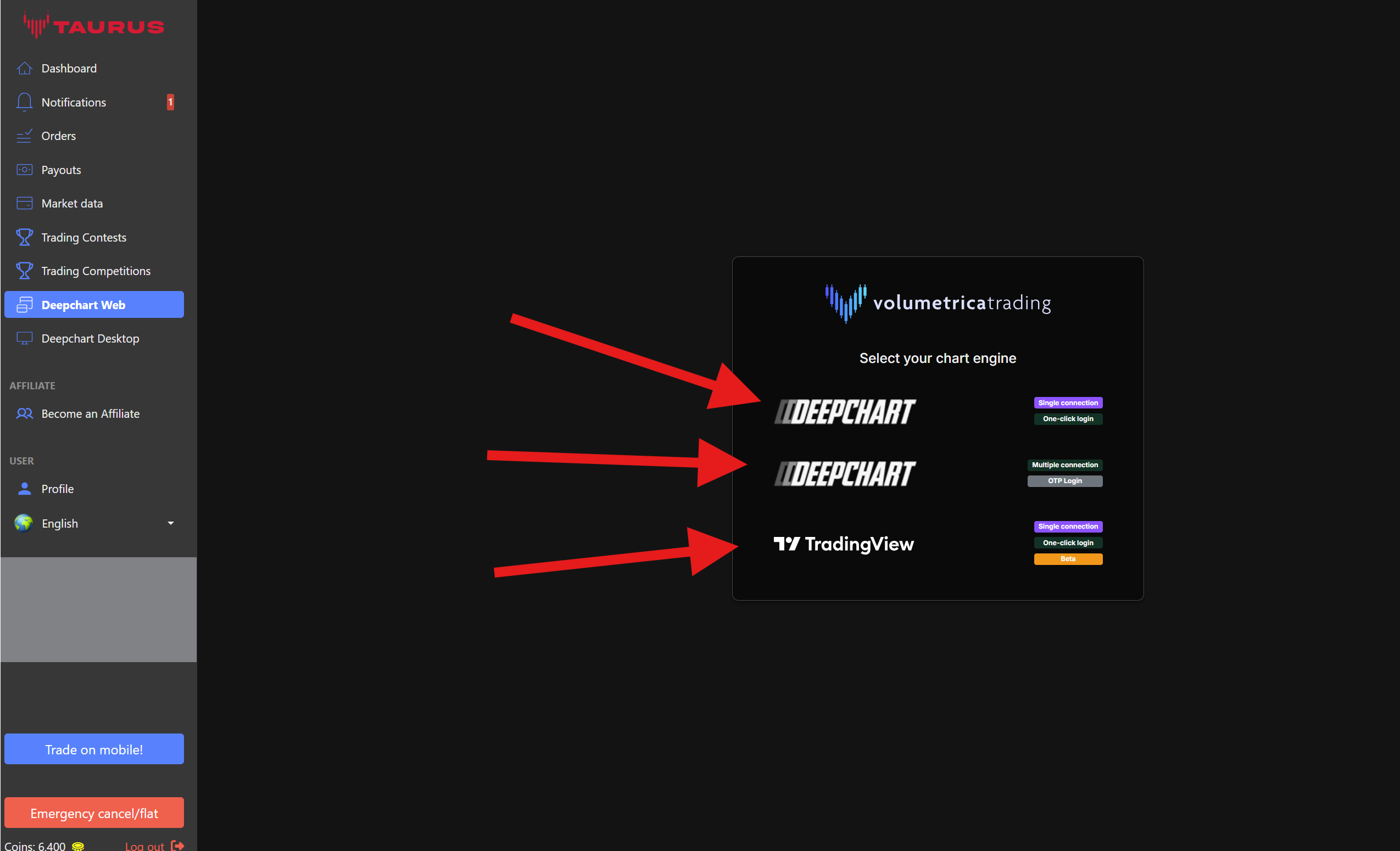
To access TradingView, open Volumetrica Web from your Taurus Dashboard.
Inside Volumetrica Web, you will find three connection options:
DeepChart – Standard Connection
This is the traditional DeepChart connection and allows you to use one connection at a time, as before.
DeepChart – Multi-Prop Connection
This option allows you to connect accounts from different prop firms that use dxFeed and use the Web Trade Copier across those accounts.
TradingView Charting
This option allows you to trade your Taurus account using TradingView charts.
Can I switch between TradingView and other platforms?
Yes. You can switch between TradingView, Volumetrica Web, DeepChart Desktop, ATAS, Quantower, or another available platform whenever you want.
However, only one connection can remain active at a time.
Before opening a new connection, make sure you completely close the platform or connection you were previously using.